Stride Podiatry Clinic: from a confusing website to a clear way to book.
Stride is an independent podiatry clinic in Wimbledon. When we took over its website in 2025, the site was slow, its structure was broken and booking was confusing. Today every visitor has a clear way to book, call or email.
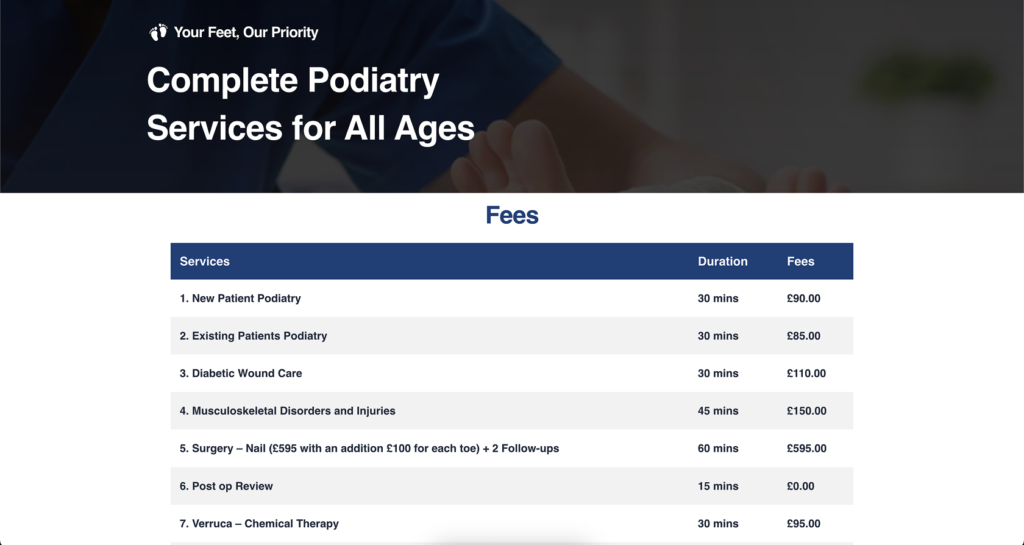
Live at stridepodiatryclinicwimbledon.com
A local clinic where every nearby patient matters.
Stride Podiatry Clinic treats everything from ingrown toenails and verrucas to custom orthotics and MSK assessments (muscles, joints and bones). Almost all of its patients live nearby. That makes the website unusually important: when someone in Wimbledon searches for help with a painful foot, the clinic gets one chance to look trustworthy and easy to book.
- Treatments range from quick fixes to longer care plans
- Patients book through the clinic's own booking system
- Many patients arrive on a phone, often in some pain
In one sentence: we took over a slow, confusing clinic website, gave every service a clear page and one obvious way to book, and keep watching how patients use it, so the clinic can focus on patients.
What was going wrong before?
The clinic came to us with a website that worked against it. It was slow to load. Its structure was broken, so some services were hard to find and some pages led nowhere useful. And booking was confusing: a patient who had already decided to book still had to work out how.
That matters more than it sounds. 54% of consumers say they are most likely to visit a business's website after reading positive reviews (BrightLocal, 2026). For a clinic with good word of mouth, that is the exact moment a new patient decides. Stride's reviews were doing their job. The website was letting patients slip away right after.
Why does a slow, confusing site cost a clinic patients?
Picture the person on the other side. They have an ingrown toenail, or a heel that hurts every morning. They search on their phone, find Stride, read a few reviews and tap through. If the page takes a long time to appear, or the booking button sends them somewhere unexpected, they go back and tap the next clinic.
Google measures this. It says a site should show its main content within 2.5 seconds to give people a good experience (Google, web.dev). Anything slower counts against you, both with patients and with Google.
What did the clinic actually need?
- A clear page for every service, so a patient looking for verruca treatment lands on verruca treatment.
- One obvious way to book, the same from every page, on any phone.
- Phone and email where patients look, because many people would rather call.
- Someone to keep it working, so the clinic team could treat patients instead of fixing web pages.
Six changes, each one about the patient.
Every item here is something we did on the clinic's live website. Nothing on this list is a plan for later.
A clear page for every service
We rebuilt the page structure so each treatment, from ingrown toenails to custom orthotics, has its own clear, working page.
A fast site, even on phones
We made the site load fast. Google treats anything slower than 2.5 seconds as a poor experience, so speed was not optional.
One "Book Appointment" path
Booking is now one clear "Book Appointment" path into the clinic's Cliniko booking system, from every single page.
Phone and email where patients look
Contact details now sit where people look for them, on every page and on mobile, not hidden at the bottom.
Security, backups and safe updates
We set up security, regular backups and updates that are checked first, so the clinic doesn't have to think about any of it.
A contact form that delivers
We tested the contact form end to end, so enquiries actually arrive in the clinic's inbox, and we keep testing it.
What a patient finds today.
The same clinic, the same treatments, the same good reviews. What changed is how easy it is to go from "this looks right" to "I've booked".
| What a patient needs | Before we started | Now |
|---|---|---|
| To find their treatment | Broken structure, hard to find | A clear, working page for every service |
| A page that loads quickly | Slow | Fast, measured against Google's 2.5 second line |
| To book | Confusing | One "Book Appointment" path from every page |
| To call or email instead | Not where patients looked | On every page, and bigger on phones |
| A site that keeps working | On the clinic's plate | Watched by us, explained in a weekly note |
From taking over to looking after it.
These are stages, in the order they happened, rather than exact dates. The last stage is ongoing, and that is the point.
We looked at the site the way a patient would.
On a phone, in a hurry, trying to book. That is how we found the three big problems: the site was slow, its structure was broken, and booking was confusing.
Structure, speed and one way to book.
- Page structure rebuilt, a clear page for each service
- Site made fast to load
- One "Book Appointment" path to Cliniko from every page
- Phone and email placed where patients look
Security, regular backups, safe updates and a tested form.
The quiet work that stops a good website from breaking later. The contact form was tested end to end, so enquiries arrive where they should.
We watch what patients do, and act on it.
For example, visitors kept tapping the phone number. So we made the number bigger and added it to more places. Small changes like this, one at a time, each one explained in the Monday note.
Monday, 8:00
Hi, a steady week at the clinic. Nothing needs you.
- Online all week, with regular checks
- Book Appointment tested from five pages, on iPhone and Android
- Contact form test arrived in your inbox
- Enquiries we can see, by name:
- Most tapped on phones this week: your phone number
- Idea: show the phone number higher on the orthotics page. Reply "yes" and we'll do it.
- Re-test booking after this week's updates
- Check opening hours match on Google
- Speed check on the busiest service pages
Names and numbers changed for illustration.
The website is off the clinic's plate.
We keep watching how visitors behave and act on what we see. The clinic focuses on patients. We look after the website and explain what changed in a short Monday note.
One example: visitors kept tapping the phone number. That matters, because healthcare had the highest missed call rate of any industry in one study, at 32% of calls (CallRail, 2025). So we made the number bigger, put it in more places, and keep an eye on how people use it.
- The booking path, from every page, on real phones
- The contact form, with a real test enquiry
- Speed, security, backups and updates
- What patients tap, and where they give up
Every visitor now has somewhere clear to go.
Most of those visitors find Stride on their own, through Google, reviews and word of mouth. We don't claim we brought them. Our job is to keep them away from dead ends: no slow page, no broken link to a treatment, no guessing how to book.
We don't publish the clinic's booking numbers or takings. Those belong to the clinic. The figure above is the one the clinic approved for this page.
If people find you, the next tap has to work.
You don't need to be a podiatrist for this story to apply. Any business where people search, read reviews and then try to book has the same weak moment.
You run a clinic
Physio, chiropractic, acupuncture, massage. Patients book at night, on phones. We test that path regularly.
Health practitionersYour booking lives elsewhere
We don't replace your booking software. We make the way into it obvious, and check it works.
Booking testingPeople look, then leave
Slow pages, buried phone numbers and confusing buttons. We find where visitors give up and fix it.
Fixes where visitors give upYou inherited a website
Taking over a site someone else built is normal for us. We start by finding the keys.
You own every keyQuestions about this case study.
Something else? Ask in the chat, email hello@penguina.website or WhatsApp us.
Why don't you name the clinic owner or show their reports?
Because the clinic is a client, not a marketing asset. Weekly notes contain patient enquiries and private details, so we never show them, not even blurred. In the note shown on this page, names and numbers are changed for illustration. Every real figure on this page was approved by the clinic.
Did you replace the clinic's booking system?
No. Replacing practice or booking software isn't our job, and the clinic's system worked. We made the path into it clear: one "Book Appointment" button that goes to the same place from every page, and we check that path keeps working.
Did Penguina bring the visitors?
We don't claim that. Most people find a local clinic through Google, reviews and word of mouth. What we can say is that every one of those visitors now lands on a site that loads fast, explains each treatment and shows a clear way to book, call or email.
Do you write the clinical information on the pages?
The clinic decides what it says about its treatments. We give no medical advice. We organise the pages, make them clear and fast, and suggest wording that the clinic checks and approves before anything goes live.
Can you do this for a clinic outside London?
Yes. We work by email and WhatsApp, so where you are matters less than how your website works. Our clients so far are in London and the Netherlands. Start with your first fix, free and we'll show you what we'd change.
What would this cost my clinic?
Our plans are Keep at $100 a month, Grow at $250 and Full Care at $500, all month to month with no setup fee. Most clinics start by seeing what their first fix finds. See all prices.
Not sure where to start? Send us your website.
We look at it the way a customer would, find up to 3 real problems, and fix one of them free. No call needed.